
使用Ubuntu系统管理工具Landscape来构建离线APT仓库:第三篇
by liam zheng on 26 January 2022
继续第二篇博客文章,现在我们将注册Landscape客户端到服务端并管理软件仓库。
使用 https注册客户端
客户端可以通过https的方式进行注册从而使用本地软件仓库。大概的操作步骤如下:
- sudo apt-get update
- sudo apt-get install landscape-client
- 从Landscape服务器传送/etc/ssl/certs/landscape_server_ca.crt landscape到客户端
- 客户端能解析到Landscape服务器的FQDN
- sudo landscape-config –account-name standalone –url https://<server>/message-system –ping-url http://<server>/ping
- 从Landscape server 仪表板接受注册的客端
演示代码如下:
ubuntu@vm-ceph1:~$ sudo mv landscape_server_ca.crt /etc/ssl/certs/
ubuntu@vm-ceph1:~$ ping -c1 vm-landscape-server.maas
PING vm-landscape-server.maas (192.168.122.91) 56(84) bytes of data.
64 bytes from vm-landscape-server.maas (192.168.122.91): icmp_seq=1 ttl=64 time=0.430 ms
ubuntu@vm-ceph1:~$
ubuntu@vm-ceph1:~$ sudo landscape-config --account-name standalone --url https://vm-landscape-server.maas/message-system --ping-url http://vm-landscape-server.maas/ping
enabled

This script will interactively set up the Landscape client. It will
ask you a few questions about this computer and your Landscape
account, and will submit that information to the Landscape server.
After this computer is registered it will need to be approved by an
account administrator on the pending computers page.

Please see https://landscape.canonical.com for more information.


The computer title you provide will be used to represent this
computer in the Landscape user interface. It's important to use
a title that will allow the system to be easily recognized when
it appears on the pending computers page.

This computer's title [vm-ceph1]:

A registration key may be associated with your Landscape
account to prevent unauthorized registration attempts.  This
is not your personal login password.  It is optional, and unless
explicitly set on the server, it may be skipped here.

If you don't remember the registration key you can find it
at https://landscape.canonical.com/account/standalone

Account registration key:

The Landscape client communicates with the server over HTTP and
HTTPS.  If your network requires you to use a proxy to access HTTP
and/or HTTPS web sites, please provide the address of these
proxies now.  If you don't use a proxy, leave these fields empty.

HTTP proxy URL:
HTTPS proxy URL:

Landscape has a feature which enables administrators to run
arbitrary scripts on machines under their control. By default this
feature is disabled in the client, disallowing any arbitrary script
execution. If enabled, the set of users that scripts may run as is
also configurable.

Enable script execution? [Y/n]: y

By default, scripts are restricted to the 'landscape' and
'nobody' users. Please enter a comma-delimited list of users
that scripts will be restricted to. To allow scripts to be run
by any user, enter "ALL".

Script users [ALL]:

You may provide an access group for this computer e.g. webservers.

Access group [ceph]:

You may provide tags for this computer e.g. server,precise.

Tags [vm-ceph1]:
Please wait...

Request a new registration for this computer now? [Y/n]: Y
System successfully registered.
ubuntu@vm-ceph1:~$
完成上述操作后,从仪表板接受客户端:
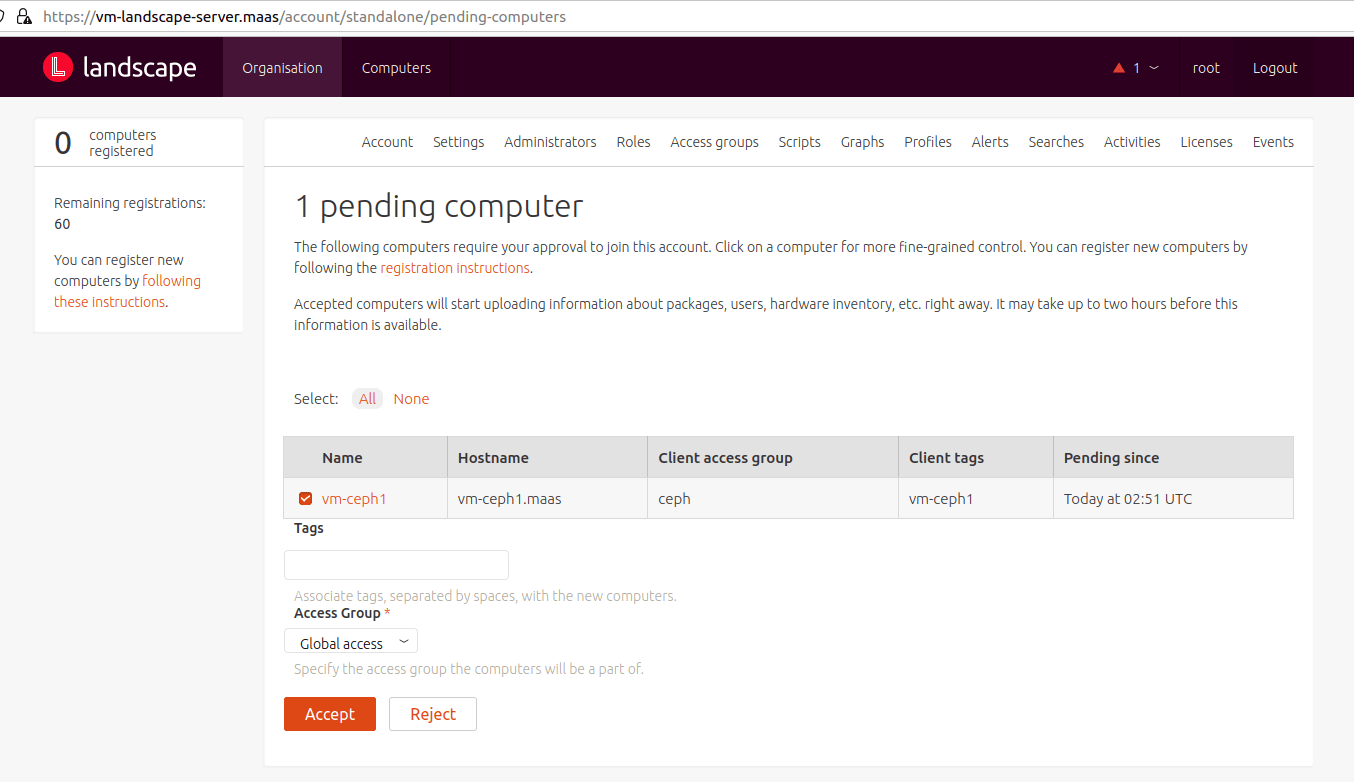
接受后,您可以看到这台计算机的标签是“vm-ceph1”,此标签将用于下一步的操作。
管理软件仓库
要让由Landscape管理的客户端使用您的本地仓库,您还需要进行下面的操作:
- 软件仓库创建一个存储库配置文件,如:
landscape-api create-repository-profile –description “This profile is for Landscape On-Premises servers.” example-profile - 计算机与存储库配置文件相关联,如:
landscape-api associate-repository-profile –tags example-tag example-profile - 将Pockets添加到存储库配置文件,如:
landscape-api add-pockets-to-repository-profile example-profile release,updates,security bionic ubuntu - 确认客户端 /etc/apt/source.list 变成:
deb http://your-server.com/repository/standalone/ubuntu focal-security main restricted universe multiverse
deb http://your-server.com/repository/standalone/ubuntu focal main restricted universe multiverse
deb http://your-server.com/repository/standalone/ubuntu focal-updates main restricted universe multiverse - 如果需要恢复:
landscape-api disassociate-repository- profile –tags example-tag example-profile
示例命令和输出:
ubuntu@vm-landscape-server:~$ landscape-api create-repository-profile --description "This profile is for Landscape On-Premises servers." example-profile
{u'access_group': u'global',
 u'all_computers': False,
 u'apt_sources': [],
 u'description': u'This profile is for Landscape On-Premises servers.',
 u'id': 1,
 u'name': u'example-profile',
 u'pending_count': 0,
 u'pockets': [],
 u'tags': [],
 u'title': u'example-profile'}
ubuntu@vm-landscape-server:~$

ubuntu@vm-landscape-server:~$ landscape-api associate-repository-profile --tags vm-ceph1 example-profile
{u'access_group': u'global',
 u'all_computers': False,
 u'apt_sources': [],
 u'description': u'This profile is for Landscape On-Premises servers.',
 u'id': 1,
 u'name': u'example-profile',
 u'pending_count': 1,
 u'pockets': [],
 u'tags': [u'vm-ceph1'],
 u'title': u'example-profile'}
ubuntu@vm-landscape-server:~$

ubuntu@vm-landscape-server:~$ landscape-api add-pockets-to-repository-profile example-profile updates focal ubuntu
{u'access_group': u'global',
 u'all_computers': False,
 u'apt_sources': [],
 u'description': u'This profile is for Landscape On-Premises servers.',
 u'id': 1,
 u'name': u'example-profile',
 u'pending_count': 1,
 u'pockets': [{u'apt_source_line': u'deb http://vm-landscape-server.maas/repository/standalone/ubuntu focal-updates restricted',
               u'architectures': [u'amd64'],
               u'components': [u'restricted'],
               u'creation_time': u'2022-01-04T08:50:46Z',
               u'gpg_key': {u'fingerprint': u'be50:6aea:aaaa:977f:0302:b161:c308:d9a6:a02f:e060',
                            u'has_secret': True,
                            u'id': 1,
                            u'key_id': u'C308D9A6A02FE060',
                            u'name': u'mirror-key'},
               u'include_udeb': False,
               u'mirror_suite': u'focal-updates',
               u'mirror_uri': u'http://hk.archive.ubuntu.com/ubuntu/',
               u'mode': u'mirror',
               u'name': u'updates'}],
 u'tags': [u'vm-ceph1'],
 u'title': u'example-profile'}
ubuntu@vm-landscape-server:~$
到此就完成了利用Landscape创建APT本地离线软件仓库的教程。Landscape系统管理工具可免费在10台机器上使用,如您有超过10台的机器需要使用Landscape来管理,那么建议您通过Ubuntu Advantage订阅服务来获得单节点最多40000台机器的功能。
如您有相关问题,可联系我们以了解更多关于Landscape的支持服务内容。
附录: 有用的参考文档链接
订阅博客文章
查看更多内容
Canonical 推出适用于 WSL 的 Ubuntu Pro
适用于 WSL 的 Ubuntu Pro 为 Windows 系统中运行的 Ubuntu 24.04 LTS WSL 实例提供一站式安全维护与企业级技术支持。该订阅服务还能为系统管理员提供全面的管理功能。 今日,Canonical 公司宣布适用于 WSL 的 Ubuntu Pro 服务正式全面上市,用户可通过 Microsoft Store 进行安装。源代码及测试版也可在 GitHub 获取。 Canonical 公司与 Microsoft 建立了良好的合作关系,携手打造优质的 WSL 使用体验。本次合作成果将惠及那些借助 WSL 开发生产级 Linux 解决方案的企业开发者。 Craig Loewen,Microsoft WSL 产品经理 Ubuntu Pro 为桌面端 […]
Ubuntu 正式登陆 Qualcomm Dragonwing™ IQ-9075 平台
Ubuntu 系统发行商 Canonical 公司 2025 年 12 月 1 日宣布,推出适用于 Qualcomm Dragonwing™ IQ-9075 平台的官方认证镜像。这款高性能工业平台现已全面适配 Ubuntu 24.04 LTS 的优化镜像并提供完整技术支持。该官方认证镜像同时适用于 Ubuntu 服务器版和桌面版,为开发者打造了坚实且安全的软件基础,可满足下一代工业自动化、机器人技术及边缘 AI 应用的开发需求。 本次发布是在 Ubuntu 全面适配 QCS6490 和 QCS5430 处理器的基础上推出的,也是 Canonical 公司为 Qualcomm Dragonwing™ 系列处理器提供技术支持的最新举措。 适用于边缘 AI 的高可靠性与高性能 […]
Canonical 发布针对 Thundercomm RUBIK Pi 3 的最新优化版 Ubuntu 镜像
Ubuntu 现已直接适配 Thundercomm RUBIK Pi 3 开发板——一款专为 AI 开发者打造、搭载高通 Dragonwing™ QCS6490 处理器的轻量型开发板。 Ubuntu 发行商 Canonical 2025 年 10 月 23 日正式宣布,推出针对 RUBIK Pi 3 开发板(一款基于 Dragonwing QCS6490 打造的强大 AI 开发板)的优化预装版 Ubuntu 镜像。此次新推出的优化版 Ubuntu 镜像即开即用,能有效缩短产品上市时间,同时提供 Canonical 官方长期技术支持。当前 RUBIK Pi 3 用户也可下载和安装新版 Ubuntu 镜像。 Ubuntu 提供驱动的快速 AI 开发平台 AI 行业发展瞬息万 […]